1
Adapters & couplers
GoPro Hero 13 Media Mod cold-shoe bar
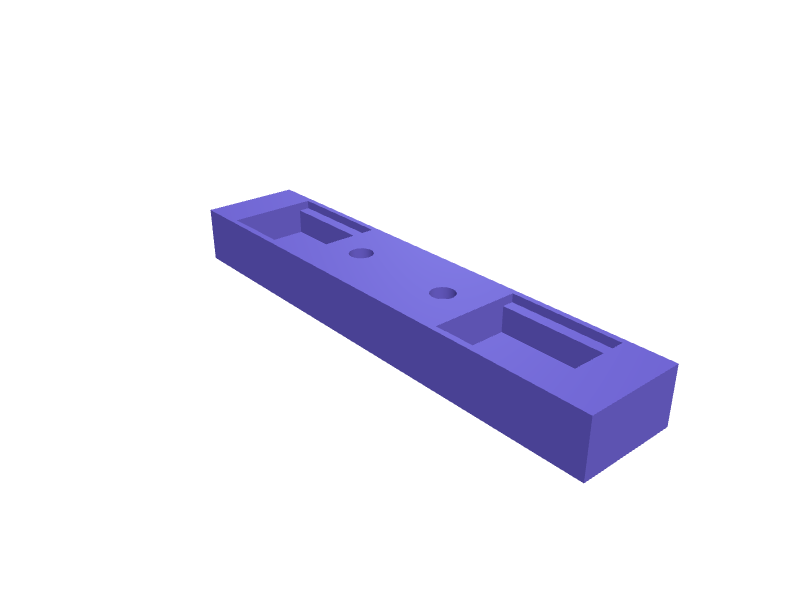
A dual cold-shoe bar that bolts onto a GoPro Hero 13 Media Mod (about 80 mm wide) so a wireless mic and a light sit on the same axis. The bar is 90 × 18 × 10 mm with two ISO 518 cold-shoe pockets 12 mm wide, and a 2-hole pattern matching the Media Mod's M2 inserts on 20 mm centres. Print in PETG with 2 mm walls. Open the ready-made model free, resize it on your phone or computer, then download a print-ready STL, 3MF or G-code sliced for your printer, free.Opening the ready-made model and downloading it as STL or 3MF are free, no card; AI changes use credits, from Maker at $7.99 a month.No printer? We print this part and ship it to your door. See its priceUpdated
2
Adjust
Change its numbers in the viewer for free, or ask the AI in the chat: wall thickness, hole size, the thing it clips onto. AI changes use 2 credits per request (1 for a quick edit, 3 for a redesign), paid with a plan from Maker at $7.99 a month, where the first 3 small changes are free.3Print
Download a watertight STL or 3MF free, with your numbers and hand edits, or G-code sliced for your printer at the same price. After an AI change the download is included in every plan (4 credits without one).
Dimensions of the ready-made model (editable)
| Parameter | Value |
|---|---|
| mm | 90 mm |
| mm | 18 mm |
| mm | 10 mm |
| rail width, mm | 12 mm |
| groove depth cut into top | 6 mm |
| overhang lip width on each side of groove | 2 mm |
| thickness of retaining lip | 1.5 mm |
| through hole clearance | 2.2 mm |
| countersink/clearance for screw head | 4.2 |
| depth of head recess | 2 mm |
Example prompt
Design a Hero 13 Media Mod cold-shoe bar 90×18×10 mm with two 12 mm ISO 518 shoes and two M2 holes on 20 mm centres, 2 mm PETG walls.
Fit notes
Hero 12 bars miss the Hero 13 Mod's shifted holes. Describe the accessories you stack in SpeakCAD, preview the bar in the browser, then download the STL.
Questions people ask about a GoPro Hero 13 Media Mod cold-shoe bar
A dual cold-shoe bar that bolts onto a GoPro Hero 13 Media Mod (about 80 mm wide) so a wireless mic and a light sit on the same axis. The bar is 90 × 18 × 10 mm with two ISO 518 cold-shoe pockets 12 mm wide, and a 2-hole pattern matching the Media Mod's M2 inserts on 20 mm centres. Print in PETG with 2 mm walls.
Click Open it free on this page and create a free account (no card): the ready-made model opens in your browser, on your phone or computer, nothing to install. Change its numbers in the viewer for free and download a watertight STL or 3MF free, or G-code sliced for your printer at the same price. An AI change in the chat uses 2 credits per request (3 for a redesign), and the download after it is included in every plan (4 credits without one). Start with Maker: 50 credits a month for $7.99, cancel anytime.
On this page: open the ready-made model free in a SpeakCAD account (no card), change any dimension in the viewer, then download the STL or 3MF free, or G-code sliced for your printer at the same price.
A shared STL is modelled for someone else's measurements. Here you open the ready-made model free, change it to your measurements in the viewer, then download a file sized for the part you actually own, free as STL or 3MF.
Yes. SpeakCAD slices the part on its servers with OrcaSlicer and your printer's official profile (380+ printers, including Bambu Lab, Prusa, Creality and Elegoo), and you download the G-code (a sliced .gcode.3mf for Bambu Lab printers). G-code sliced for your printer costs the same as the STL: included in every plan, free for a part you shaped by hand, 4 credits without a plan for a part with AI work in it. Pick your printer on the printers page to see its profile.
No. SpeakCAD runs in the browser on your phone or computer: the chat, the 3D engine and the live viewer load in the tab. The only file you download is the finished STL, 3MF or sliced G-code.
Print it your way
More adapters & couplers
Makita SP6000 track saw dust port adapter 36 mmReady-made, opens free. A swivel adapter for the Makita SP6000 and DSP600 18V LXT track saws that converts the saw's oval-ish 28 mm dust chute to a round 36 mm spigot for a Festool…Sony A7 IV Arca-Swiss plate with anti-twist lipReady-made, opens free. A camera-specific Arca-Swiss plate for the Sony A7 IV, A7R V and A7C II that cannot rotate on the 1/4-20 tripod socket because a 4 mm lip hooks the rear edge…Ortlieb Ultimate 6 bar adapter 31.8 mmReady-made, opens free. An adapter that lets an Ultimate 6 mount clamp a 31.8 mm bar instead of the 25.4 it assumes, 4 mm shim pair.Dust extraction adapter, 35 mm tool port to 58 mm hoseReady-made, opens free. A tapered adapter that connects the small 35 mm dust port on a sander or router to the 58 mm hose of a shop vacuum, so chips end up in the bin instead of on…Quad Lock to 1/4-20 tripod adapter plateReady-made, opens free. A disc that screws onto any tripod, gimbal or selfie stick with a standard 1/4-20 thread and carries a Quad Lock style twist recess, so a phone in a Quad Loc…Wahoo ELEMNT Roam adapter for Garmin quarter-turn mountsReady-made, opens free. A Wahoo ELEMNT Roam or Bolt will physically lock into a Garmin quarter-turn mount, but Wahoo's tabs are rotated 90 degrees so the screen ends up sideways.