1
Everyday fixes
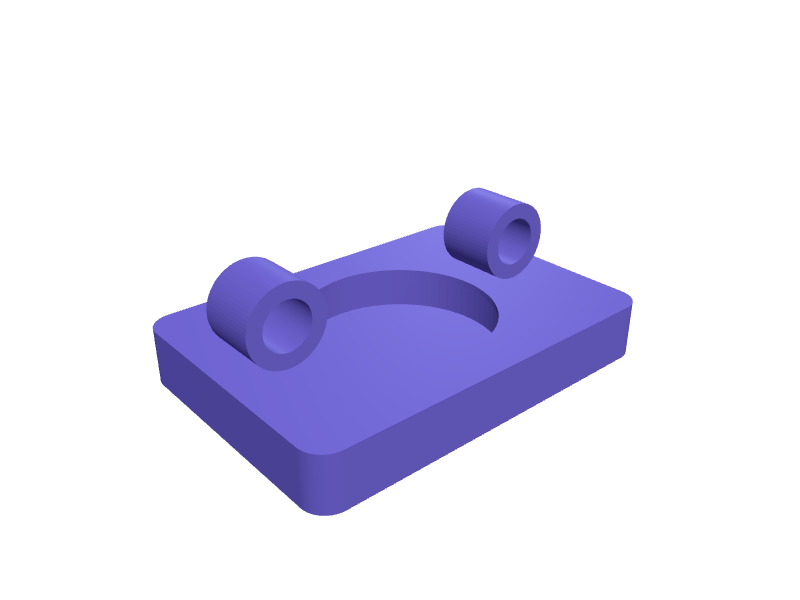
AirTag saddle-rail stealth cover
A cover that looks like a rail bumper and holds an AirTag between 7 mm rails with 1 mm TPU lips. Print in TPU. Open the ready-made model free, resize it on your phone or computer, then download a print-ready STL, 3MF or G-code sliced for your printer, free.Opening the ready-made model and downloading it as STL or 3MF are free, no card; AI changes use credits, from Maker at $7.99 a month.No printer? We print this part and ship it to your door. See its priceUpdated
2
Adjust
Change its numbers in the viewer for free, or ask the AI in the chat: wall thickness, hole size, the thing it clips onto. AI changes use 2 credits per request (1 for a quick edit, 3 for a redesign), paid with a plan from Maker at $7.99 a month, where the first 3 small changes are free.3Print
Download a watertight STL or 3MF free, with your numbers and hand edits, or G-code sliced for your printer at the same price. After an AI change the download is included in every plan (4 credits without one).
Dimensions of the ready-made model (editable)
| Parameter | Value |
|---|---|
| AirTag well diameter | 32 mm |
| Well cavity depth | 7 mm |
| TPU lip height | 1 mm |
| TPU lip inward overhang | 1 mm |
| Floor thickness under well | 2 mm |
| Plate margin around well | 6 mm |
| Plate margin beyond rail clips | 3 mm |
| Rail diameter | 7 mm |
| Clip wall thickness | 2.5 mm |
| Clip length along rail | 10 mm |
| Snap opening width | 4 mm |
| Clearance around rail (snap fit) | 0.4 mm |
Example prompt
Create a saddle-rail AirTag cover for 7 mm rails, 32 mm well, 1 mm TPU lips.
Fit notes
A hanging tag is obvious. In SpeakCAD you measure the rail spacing, preview the cover in the browser, then download the STL.
Questions people ask about an AirTag saddle-rail stealth cover
A cover that looks like a rail bumper and holds an AirTag between 7 mm rails with 1 mm TPU lips. Print in TPU.
Click Open it free on this page and create a free account (no card): the ready-made model opens in your browser, on your phone or computer, nothing to install. Change its numbers in the viewer for free and download a watertight STL or 3MF free, or G-code sliced for your printer at the same price. An AI change in the chat uses 2 credits per request (3 for a redesign), and the download after it is included in every plan (4 credits without one). Start with Maker: 50 credits a month for $7.99, cancel anytime.
On this page: open the ready-made model free in a SpeakCAD account (no card), change any dimension in the viewer, then download the STL or 3MF free, or G-code sliced for your printer at the same price.
A shared STL is modelled for someone else's measurements. Here you open the ready-made model free, change it to your measurements in the viewer, then download a file sized for the part you actually own, free as STL or 3MF.
Yes. SpeakCAD slices the part on its servers with OrcaSlicer and your printer's official profile (380+ printers, including Bambu Lab, Prusa, Creality and Elegoo), and you download the G-code (a sliced .gcode.3mf for Bambu Lab printers). G-code sliced for your printer costs the same as the STL: included in every plan, free for a part you shaped by hand, 4 credits without a plan for a part with AI work in it. Pick your printer on the printers page to see its profile.
No. SpeakCAD runs in the browser on your phone or computer: the chat, the 3D engine and the live viewer load in the tab. The only file you download is the finished STL, 3MF or sliced G-code.
Print it your way
More everyday fixes
Snap cable wrap for charging cablesReady-made, opens free. Charging cables knot in a bag unless something holds the coil, and a rigid wrap works better than a velcro strap that sheds fluff.Leatherman Wave belt clip sheath holsterReady-made, opens free. A rigid kydex-style holster for the Leatherman Wave+, Charge or Surge that clips onto a 40 mm belt or a MOLLE column and lets the tool drop into your palm wi…Galaxy S26 Ultra car vent cradleReady-made, opens free. A vent-clip cradle for a Samsung Galaxy S26 Ultra (about 164 × 79 × 8.1 mm) with a 82 × 12 mm well that clears the camera island and a pair of 10–16 mm slat…Porsche Macan Electric armrest key trayReady-made, opens free. A felt-style tray that sits in a Macan Electric armrest bin for the key and sunglasses, 160 × 80 × 20 mm.AirTag house-key silent snap fobReady-made, opens free. A silent fob that holds an AirTag and a house key on a 6 mm ring without the rattle of Apple's plastic case.Dashboard key and sunglasses holderReady-made, opens free. Keys and sunglasses slide around a flat dash and end up under the seat.