1
Organizers & storage
SD card and USB stick desktop caddy
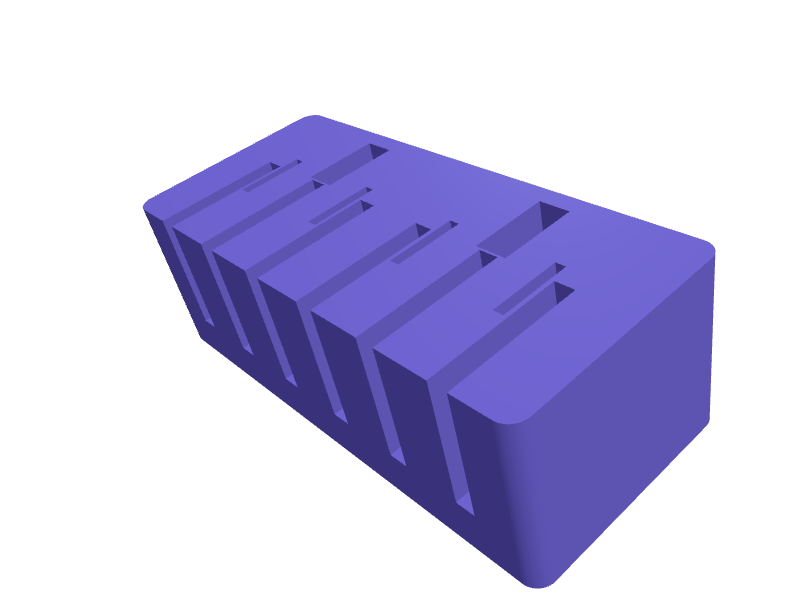
A compact block with angled slots that hold SD cards, microSD adapters and USB flash drives upright so the labels face you. Slots for full-size SD cards are 25 mm wide by 2.8 mm thick, microSD pockets are 11.5 by 1.2 mm, and USB slots are 13 by 5 mm; a 0.3 mm clearance keeps insertion firm without scratching contacts. A 15 degree lean lets cards stand without falling, and a solid 8 mm base stops the caddy tipping. Open the ready-made model free, resize it on your phone or computer, then download a print-ready STL, 3MF or G-code sliced for your printer, free.Opening the ready-made model and downloading it as STL or 3MF are free, no card; AI changes use credits, from Maker at $7.99 a month.No printer? We print this part and ship it to your door. See its priceUpdated
2
Adjust
Change its numbers in the viewer for free, or ask the AI in the chat: wall thickness, hole size, the thing it clips onto. AI changes use 2 credits per request (1 for a quick edit, 3 for a redesign), paid with a plan from Maker at $7.99 a month.3Print
Download a watertight STL or 3MF free, with your numbers and hand edits, or G-code sliced for your printer at the same price. After an AI change the download is included in every plan (4 credits without one).
Dimensions of the ready-made model (editable)
| Parameter | Value |
|---|---|
| X | 90 mm |
| Y | 40 mm |
| Z | 30 mm |
| clearance per side added to slot width | 0.3 mm |
Example prompt
Model a desktop media caddy 90 mm long, 40 mm deep and 30 mm tall with six SD card slots 25 x 2.8 mm, four microSD slots 11.5 x 1.2 mm and two USB stick slots 13 x 5 mm, tilted back 15 degrees with 0.3 mm clearance.
Fit notes
Generic caddies never match the mix of media you own. In SpeakCAD you say how many of each card type you carry and the chat produces a caddy with exactly those pockets. Preview it in the browser, adjust slot depth or spacing by replying, and download the STL only when the layout is right.
Questions people ask about an SD card and USB stick desktop caddy
A compact block with angled slots that hold SD cards, microSD adapters and USB flash drives upright so the labels face you. Slots for full-size SD cards are 25 mm wide by 2.8 mm thick, microSD pockets are 11.5 by 1.2 mm, and USB slots are 13 by 5 mm; a 0.3 mm clearance keeps insertion firm without scratching contacts. A 15 degree lean lets cards stand without falling, and a solid 8 mm base stops the caddy tipping.
Click Open it free on this page and create a free account (no card): the ready-made model opens in your browser, on your phone or computer, nothing to install. Change its numbers in the viewer for free and download a watertight STL or 3MF free, or G-code sliced for your printer at the same price. An AI change in the chat uses 2 credits per request (3 for a redesign), and the download after it is included in every plan (4 credits without one). Start with Maker: 50 credits a month for $7.99, cancel anytime.
On this page: open the ready-made model free in a SpeakCAD account (no card), change any dimension in the viewer, then download the STL or 3MF free, or G-code sliced for your printer at the same price.
A shared STL is modelled for someone else's measurements. Here you open the ready-made model free, change it to your measurements in the viewer, then download a file sized for the part you actually own, free as STL or 3MF.
Yes. SpeakCAD slices the part on its servers with OrcaSlicer and your printer's official profile (380+ printers, including Bambu Lab, Prusa, Creality and Elegoo), and you download the G-code (a sliced .gcode.3mf for Bambu Lab printers). G-code sliced for your printer costs the same as the STL: included in every plan, free for a part you shaped by hand, 4 credits without a plan for a part with AI work in it. Pick your printer on the printers page to see its profile.
No. SpeakCAD runs in the browser on your phone or computer: the chat, the 3D engine and the live viewer load in the tab. The only file you download is the finished STL, 3MF or sliced G-code.
Print it your way
More organizers & storage
IKEA SKÅDIS holder for Festool Domino tenonsReady-made, opens free. A SKÅDIS box that holds Domino tenons in four labelled wells (4, 5, 6, 8 / 10 mm) with a 5 mm hook pair.Dyson Airwrap smoothing-brush caddyReady-made, opens free. A caddy that holds the firm and soft Airwrap smoothing brushes plus the flyaway attachment in labelled wells so the magnets do not click together in a drawer.Hair tie and claw clip organizer standReady-made, opens free. A bathroom counter stand with a vertical 25 mm post for stacking elastic hair ties, a slotted rail that grips claw clips by their hinges, and a small cup for…Raspberry Pi Pico breadboard holder with jumper wire trayReady-made, opens free. A baseplate that holds a half-size breadboard and a Raspberry Pi Pico side by side, with a tray for the jumper wires that otherwise end up in a knot.IKEA Kallax insert divider for 33 cm cubesReady-made, opens free. A cross-shaped divider that slots into a single Kallax cube and splits the 33 by 33 cm opening into four compartments for scarves, yarn, cables or toys.DJI Mini 4 Pro ND filter case with six slotsReady-made, opens free. A pocket case for the snap-on ND filters used by the DJI Mini 4 Pro and Mini 3 Pro, which measure roughly 25 x 24 mm and 8 mm deep including the clip and are…